
Connect to OpenClaw
For OpenClaw, the cleanest path is the public Agent Analytics skills repo. It keeps setup agent-native while using the same underlying analytics surface the CLI and API expose.
The important detail: npx is only the launcher. The skill is using the official Agent Analytics CLI, and that CLI wraps the same documented HTTP API shown in the docs.
Prerequisites
Section titled “Prerequisites”- Access to the OpenClaw environment where you want the skill installed
npxavailable in that runtime- Access to the Google or GitHub sign-in you want to connect when OpenClaw sends the approval link
Recommended: install from the public skills repo
Section titled “Recommended: install from the public skills repo”Tell OpenClaw:
Please install the Agent Analytics skill:
npx skills add agent-analytics/skills
The public skill repo is here:
Once installed, OpenClaw can create projects, generate tracking snippets, query stats, inspect funnels, and manage experiments from the same conversation loop.
The public skill repo also includes agent-analytics-autoresearch, which is the growth-loop skill for producing experiment candidates from analytics data. Use the regular Agent Analytics skill for setup and reporting; use the autoresearch skill when you want the loop to generate, critique, judge, and rerun variants from measured evidence.
Then ask OpenClaw:
Set up Agent Analytics for this project. Install it here if needed. Send me the login link and wait. I will sign in with Google or GitHub, approve it, and paste back any finish code if you need it. Then create the project, add tracking and key events, and verify the first event.
The normal OpenClaw path is:
- install the skill
- ask OpenClaw to set up the project
- let OpenClaw start detached login, send the browser approval link, and stop waiting on that start command
- sign in in the browser
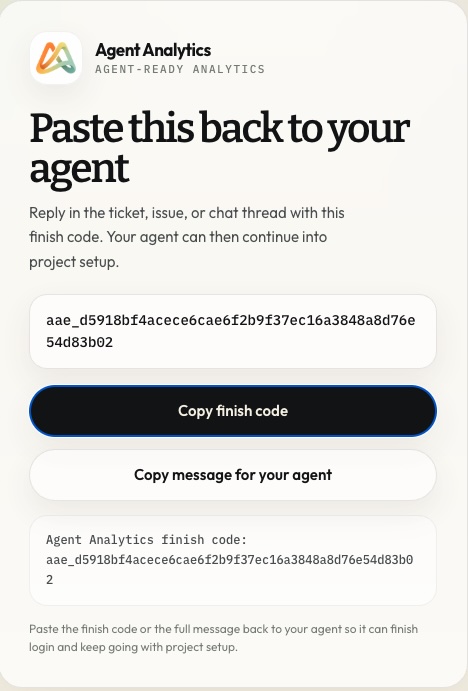
- paste back the finish code in the same thread
- let OpenClaw continue into project setup and first-event verification
In headless OpenClaw environments, this finish-code handoff is the normal login path because it does not depend on a long-running polling process. The browser page should look like this:
Persistent auth storage
Section titled “Persistent auth storage”OpenClaw and similar managed runtimes should not rely on the default home config path for Agent Analytics auth. Use a persistent OpenClaw-managed workspace path before login:
export AGENT_ANALYTICS_CONFIG_DIR="$PWD/.openclaw/agent-analytics"npx --yes @agent-analytics/cli@0.5.37 login --detachednpx --yes @agent-analytics/cli@0.5.37 auth statusKeep that setting on every Agent Analytics CLI command in the task. If shell environment persistence is uncertain, prefix each command:
AGENT_ANALYTICS_CONFIG_DIR="$PWD/.openclaw/agent-analytics" npx --yes @agent-analytics/cli@0.5.37 projectsFor one-off debugging, --config-dir "$PWD/.openclaw/agent-analytics" works before or after the command. Ensure .openclaw/ is gitignored before login, and never commit .openclaw/agent-analytics/config.json.
The public docs still matter because they show exactly what the skill is wrapping:
That is the right explanation if a security review asks what the npx command is doing.
Verify the install
Section titled “Verify the install”Ask OpenClaw:
Set up Agent Analytics for this project. Install it here if needed. Send me the login link and wait. I will sign in with Google or GitHub, approve it, and paste back any finish code if you need it. Then create the project, add tracking and key events, and verify the first event.How is my-site doing this week?Create a recurring 8:00 AM analytics job. Every morning, query Agent Analytics for the latest 24 hours across my projects and send me a short brief with anomalies, winners, drop-offs, and one recommended action.
If you have not created your first real project yet, continue with First Project in 5 Minutes.
Troubleshooting
Section titled “Troubleshooting”- If OpenClaw flags the skill because of
npx, point reviewers to CLI vs MCP vs API and API Reference. The CLI is the official wrapper around those documented endpoints. - If OpenClaw sends you an approval link but never resumes, paste the finish code back into the same thread.
- If login worked earlier but later says “Not logged in”, run
auth statusand confirmAGENT_ANALYTICS_CONFIG_DIRpoints at the persistent.openclaw/agent-analyticspath. - If the skill installs but cannot query data after login, confirm the browser approval completed with the same Agent Analytics account you expect to use.
- If you intentionally use a compatibility API key for direct HTTP debugging, keep
AGENT_ANALYTICS_API_KEYin the OpenClaw runtime instead of pasting it into chat. - If you need endpoint-level debugging, use the API reference with
curlbefore returning to the skill flow.