
Connect to Paperclip
📎Paperclip is open-source orchestration for zero-human companies. The clean Agent Analytics path in 📎Paperclip is now:
- ask the user to create one task for the CEO
- review the blocked task when login approval is needed
- ask the analyst the first real traffic or signup question
Use Connect as agent if you want the agent to own that blocked-login handoff from start to finish. Use Connect as human only when you need direct account access yourself, not because the setup flow has changed.
For normal Paperclip setup, keep browser approval and finish-code handoff as the default path. Paid upgrades use the CLI handoff link, not a pasted API key.
If you want the strategic context before you set this up, read If You Use Paperclip, You Need End-User Analytics.
If the engineer already has access and you only need the activation loop, continue with First Project in 5 Minutes.
Step 1: create one CEO task
Section titled “Step 1: create one CEO task”For most Paperclip companies, the setup should start with one explicit CEO task.
Task title:
Hire an analyst to use AgentAnalyticsTask description:
Hire or assign the analytics analyst for our company.
First install the Agent Analytics skill in Paperclip:npx skills add agent-analytics/skills
Make sure Agent Analytics is available to the analyst and the engineer working on the project. Ask the engineer on the relevant project to set up Agent Analytics tracking in the codebase.
If approval is needed, send me the approval link, wait for me to sign in with Google or GitHub, accept the finish code I reply with, and then continue by creating the project, adding tracking and key events, and verifying the first event.
Step 2: review the blocked task and approve login
Section titled “Step 2: review the blocked task and approve login”At some point, the working agent will return that the task is blocked because it needs your help with login approval.
When that happens:
- open the login approval URL the agent posted in the Paperclip task
- sign in with Google or GitHub
- copy the finish code from the browser
- paste that finish code back into the blocked Paperclip task
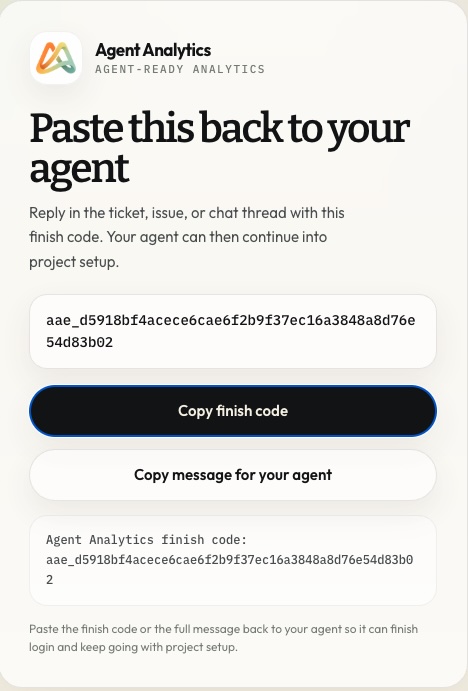
That lets the working setup agent continue:
- finish login
- create the project
- add tracking
- verify the first event
If your Paperclip company wants a shared install primitive, the company skill key is still:
agent-analytics/skills/agent-analyticsBut that is implementation detail, not the main product story. The important path is still: create one CEO task, let it drive the setup in the real project, then ask real analytics questions.
What approval looks like in practice
Section titled “What approval looks like in practice”In Paperclip, the detached login flow should look like this:
- the working setup agent starts Agent Analytics detached login, gets an approval URL, and the start command exits
- you open that URL in the browser
- you sign in with Google or GitHub
- the browser shows a finish code
- you paste that finish code back into the Paperclip issue thread
- the working setup agent uses that code to complete login and keep going
Paperclip should not depend on a long-running polling command for this path. The finish-code reply is the handoff that lets the agent resume reliably inside the issue thread.
The important product rule is simple: the user approves identity in the browser, but the working agent ends up holding the session and continues the setup.
If you later want to review or revoke that Paperclip-owned session, open app.agentanalytics.sh, go to Account Settings, and use the Agent Sessions section. That page now shows active Paperclip, CLI, macOS Live, and similar hosted agent logins.
Step 3: ask the analyst real questions
Section titled “Step 3: ask the analyst real questions”Once the engineer has the project live, ask the analyst real questions:
Show me traffic, top pages, recent events, signups, purchases, and feature usage for this project.Set up an A/B experiment for this project and help me decide what to change next.Create a recurring 8:00 AM analyst job. Every morning, query Agent Analytics for the latest 24 hours across this company's projects and post a short brief with anomalies, winners, drop-offs, and one recommended action.
The success condition is not just login. The success condition is:
- the setup agent can authenticate through browser approval and finish-code handoff
- create the project
- verify the first live event
- the analyst can answer a real analytics question from the same issue flow
Fast rollout order for Paperclip companies
Section titled “Fast rollout order for Paperclip companies”Use this order if you want the shortest path to first value:
- create the CEO task
- let that task cover the analyst and the engineer in one delegation path
- review the blocked task when the working agent needs approval
- sign in and reply with the finish code
- let the working agent create the first project and verify the first event
- ask the analyst one real traffic or signup question
- add the recurring 8:00 AM analyst brief once the first traffic question works
Compatibility API keys
Section titled “Compatibility API keys”If you need direct HTTP access for a custom server-side runtime later, you can still generate a raw API key from app.agentanalytics.sh. Keep that outside the normal Paperclip setup and upgrade path.
For the normal Paperclip setup path, prefer browser approval plus finish code handoff.
When to use a different page
Section titled “When to use a different page”- Use Getting Started if you want the shortest overview for the whole product.
- Use Installation if you need the raw per-environment install pages outside the Paperclip company flow.
- Use First Project in 5 Minutes if the engineer already has access and you want the clearest install-to-live walkthrough.
- Use Tracker.js if you need browser-side details such as SPA tracking, declarative events, consent, errors, or web vitals.
- Use CLI vs MCP vs API if your team is deciding between access paths.